
Key takeaways
- A replica isn’t a backup. It inherits deletion, corruption, and encryption at replication speed, which leaves you nothing clean to return to.
- The mechanism a workload gets should follow from two numbers: How much time’s worth of data the business can lose (RPO) and how long it can be down (RTO). Not from what was configured when it was provisioned.
- A successful job proves the job ran. It doesn’t prove a copy was created, that the copy restores inside your RTO, or that it’s free of malware.
- Workload data spread across separate backup tools means separate retention policies, separate restore runbooks, and no single answer to “what is our recovery posture?”
- The tiering table below can be run against your own environment to find where protection and business tolerance have drifted apart.
Your jobs completed last night. Retention is enforced, repositories are provisioned, and the dashboard has been green all week. None of that answers the two questions you’ll get in the first 10 minutes of an incident:
- How fast can we be back?
- And back to what?
Both questions are about recovery. What differs is the route. There are two: Backup and replication.
Backup retains a point in time you can return to. Replication maintains a standby you can switch to, with no restore to run at all. Both are legitimate, but they fail in opposite ways.
Using one where the other belongs is the most expensive protection mistake in an enterprise estate. If you’re comparing backup and restore software right now, that’s the decision sitting underneath the feature grid.
So why does this keep going wrong in estates run by people who know what they’re doing? Because most of these configurations were set once, correctly, for conditions that have since changed. The numbers bear that out. Most enterprises believe they’re protected, and only 28% fully recover.
Full, incremental, and differential mechanics are settled, so one table below covers them. The rest of this piece goes to what isn’t settled. Which workloads have earned replication. What proves a restore works. What coverage across a modern estate has to include.
Backup, recovery, replication, and disaster recovery are four different things
Start with the vocabulary, because these four terms get used interchangeably in procurement conversations. Defining them against each other works better than defining each one alone.
Backup is a point-in-time copy of your data, kept on a retention policy. Its defining property is history: A state from before the incident stays available. Writing it to separate storage is a best practice rather than part of the definition. It’s also the practice that makes the copy survive an event on the source.
Recovery is the act of returning data or a system to a usable state. It gets measured, not assumed. Two numbers do the measuring: RTO, how long the return takes, and RPO, how much time’s worth of data the return loses.
Replication keeps a standby copy in sync at a second location, continuously or near-continuously. You switch to it rather than restore from it. That distinction is the whole point. You aren’t waiting on a restore operation, you’re powering on something that is already there. The limitation? It carries forward whatever happens to the source, including deletion and encryption.
Disaster recovery is the plan and the orchestration around all three. The order systems come back in. Who authorizes a failover. Which dependencies have to be live first. A backup product is a component of disaster recovery, not a substitute for the plan.
So what happens if you pick just one? An estate that only backs up will recover, slowly. An estate that only replicates will resume fast, until the event is logical rather than physical. Then it has nothing to fall back to. Most enterprise estates need both. That’s why platforms like Veeam Data Platform manage backup and replication under one policy layer instead of as separate products.
Backup types, settled in one table
You know these four types. They’re here as a scannable reference rather than four narrative subsections. One is worth a second look: Synthetic full. Most competitor explainers leave it out, and it resolves the tension between restore speed and backup window.
| Type | What it copies | What a restore needs | Backup window | Storage cost | Best fit |
| Full | Every block in scope, every run | The single full backup | Longest | Highest | Baselines, and periodic anchors for long retention |
| Incremental | Changes since the previous backup of any type |
The full plus every increment in the chain | Shortest | Lowest | High-frequency protection, tight backup windows |
| Differential | Changes since the last full backup |
The full plus one differential | Grows through the cycle |
Middle | Short restore chains without daily fulls |
| Synthetic full | Nothing new from production; assembles a full from existing backup data | The synthetic full alone | No production impact | Middle | Full-restore simplicity, no production reads |
Two decisions sit next to this one rather than inside it. Retention is separate from backup type. Grandfather-father-son retention is what makes a chain satisfy a compliance requirement. The 3-2-1-1-0 Rule is what makes it survive an attack on the primary copy.
Storage tier is separate too, and it sets restore speed as much as the backup type does. Performance disk, object storage, and an offline copy produce very different recovery profiles from identical jobs. So, “How do we back it up?” and “Where does it land?” must be answered together. One capability worth checking in your platform is whether NAS backups can target archive-tier storage as a primary repository. If they can, long-term retention no longer has to be priced at performance-tier rates.
Choose backup or replication by what downtime actually costs
The question isn’t which mechanism is better. It’s which one this workload has earned.
Tier the estate by what the business can tolerate, then assign the mechanism that meets it. Start from the tool you already own, and you end up protecting a departmental file share more aggressively than an order-entry database.
Treat the table as a working document. Run it against your own environment. The value is in the mismatches, and they run both directions: Workloads protected well above their real tolerance, and workloads quietly protected well below it.
| Tier | Example workloads | Data loss tolerance (RPO) | Downtime tolerance (RTO) | Mechanism that meets it |
| Tier 1 | Payments, order entry, core clinical or banking systems | Seconds | Minutes | Continuous replication with rehearsed failover, plus backup for a clean historical point |
| Tier 2 | ERP modules, line-of-business applications, primary file services | 15 minutes to 1 hour | 1 to 4 hours | Frequent backup with instant recovery; replication only for the tier’s highest-value systems |
| Tier 3 | Microsoft 365, collaboration platforms, departmental shares | 4 to 24 hours | Same business day | Scheduled backup with item-level restore and retention long enough for legal hold |
| Tier 4 | Development and test, reproducible builds, archival data | 24 hours or more | Best effort | Periodic backup to low-cost object storage, or documented rebuild from source |
Replication is not a backup. A replica running 30 seconds behind production is also 30 seconds behind a ransomware encryption event.
Every tier above that lists replication also lists backup. That pairing is deliberate, not redundant. Replication determines how quickly you can resume operations; backup determines the point you can recover to. For anything in Tier 1, you need both answers.
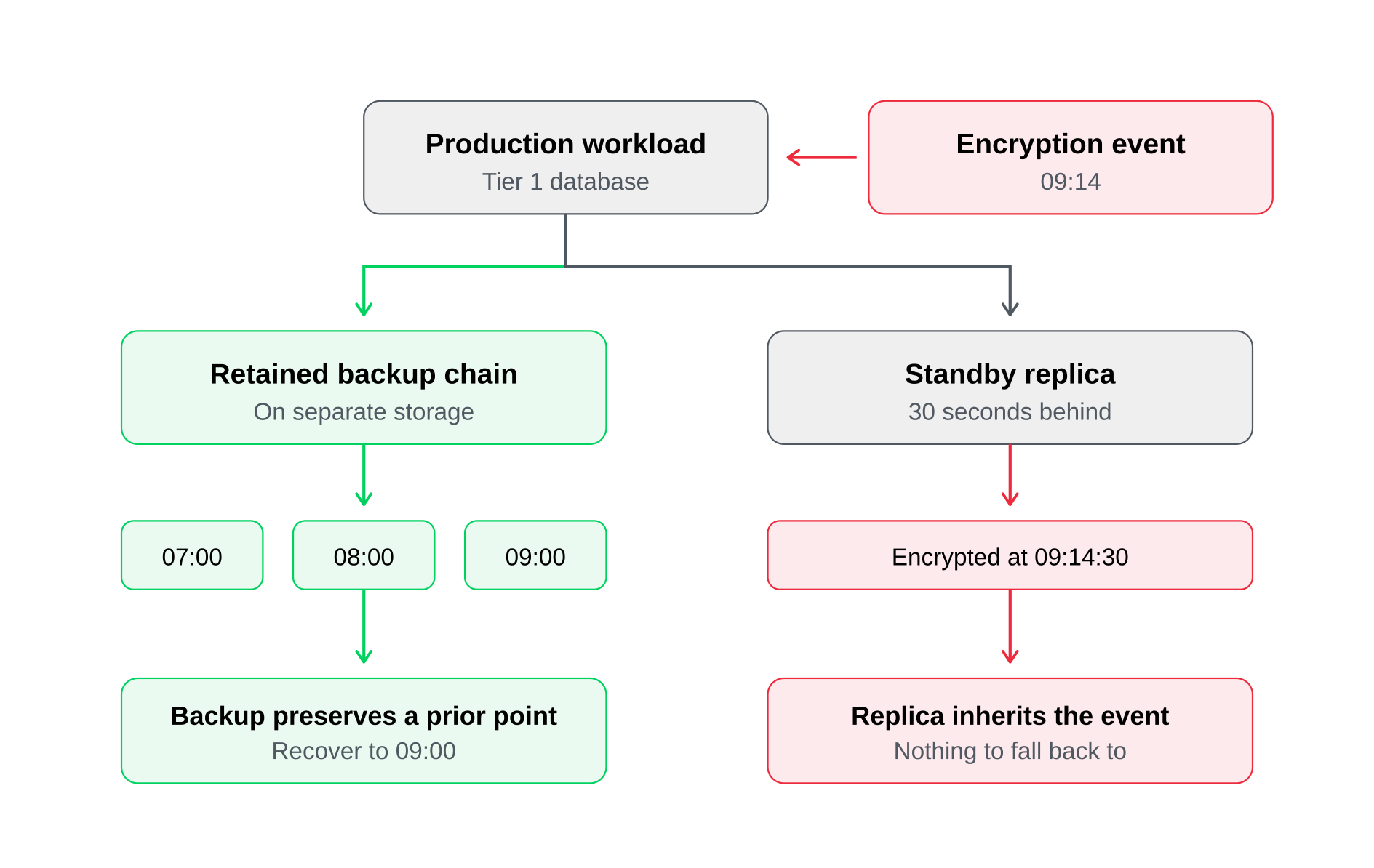
Here’s a mismatch in practice. A departmental file share gets replicated to a second site because it was easy to add to an existing job. It now carries a minutes-long RTO nobody asked for. Two racks over, an order-entry database runs on a nightly backup alone: A full business day of exposure nobody priced either. Neither was a decision. Both were inherited, and both carry costs in opposite directions.
Now for the objection you’ll hit internally. Near-zero RPO costs real money in bandwidth, second-site capacity, and licensing. Tiering is what makes that spend defensible. It puts the cost against a named business consequence instead of spreading it evenly across workloads that don’t need it. When someone asks why payment systems are replicated but development and test environments aren’t, the tier provides the answer.
Where near-zero RPO is genuinely required, continuous data protection is the mechanism. It ships under different names depending on the vendor, and coverage varies by workload and operating system. Check which of yours are actually supported before you design a tier around it.
A completed backup job is not a proven recovery
Your monitoring reports on the backup. You get measured on the restore. A green job status proves less than it looks like it proves.
Start with what a successful job tells you: the job ran. That is not the same as a copy existing. Threat actors routinely remove workloads from backup jobs, and an empty job can complete successfully with nothing in it. So before you ask whether a restore point is usable, confirm it exists and holds what you think it holds. From there, map your recovery options to the tiers you’ve defined: Granular file- and item-level recovery; running a workload directly from backup while the full restore completes in the background; volume-level recovery; bare-metal recovery to dissimilar hardware; and orchestrated recovery of interdependent applications in the correct sequence. The key is knowing which recovery option each workload requires.
What turns a copy into a proven recovery comes down to four capabilities:
- Automated restore testing, which boots a restore point in an isolated network and runs application-level checks on top of the standard ones, not just a ping.
- Malware and indicator-of-compromise scanning, which inspects restore points so a restore doesn’t reintroduce the payload.
- Clean point identification, which tells you which restore point to use instead of defaulting to the most recent.
- Immutability, which ensures the point can’t be altered after it’s written.
Clean point identification is where most estates are exposed. Dwell time is why. An intruder present for weeks means your recent restore points are already compromised. Without a way to find a clean one, your options collapse to guessing or paying. “Most recent” is the wrong default in exactly the scenario you bought backup for.
What a real restore test involves
Boot the restore point in an isolated network. Run the standard checks, then application-level validation on top. Does the database engine open it? Does the web tier serve? Record the result against a named RPO and RTO target, then remediate the failures.
That produces the artifact your board, your auditor, and your cyber insurance questionnaire all want. A dated report naming which workloads were restore-tested, against which targets, pass or fail. It’s achievable at scale. Quest Global reports a 100% success rate across its data recovery tests. An estate that can’t produce that report on demand isn’t measurably recoverable, whatever the dashboard says.
For Tier 1 and Tier 2, this has to be scheduled and orchestrated. Manual testing on a quiet afternoon doesn’t survive a busy quarter. That’s the case for recovery orchestration with documented runbooks.
What enterprise backup and recovery has to cover now
Nothing about your estate broke. It grew.
The environment you protect today spans platforms that didn’t exist when the original protection policies were written. Gaps show up at the seams between those platforms, not inside any one of them.
Audit your coverage against this list:
- Virtual machines across multiple hypervisors rather than one
- Physical Windows and Linux servers, plus endpoints
- Databases with application-aware processing rather than a crash-consistent file copy
- Unstructured data on NAS at a scale where full scans are no longer viable
- SaaS platforms, where the provider’s shared responsibility model stops well short of point-in-time recovery of your own content
- Public cloud workloads
- Containerized applications, where the persistent volume and the cluster configuration are two separate recovery problems
Veeam publishes its full workload coverage if you want to check yours against it.
The consolidation argument is about operational cost, not vendor preference. Workload data spread across separate backup tools means retention policies to reconcile, runbooks to maintain and train people on, and consoles to check during an incident. Nothing answers the question, “What is our recovery posture?” in one place. The cost isn’t licensing. It’s the hours, and the blind spots.
A quick self-test. Name the last workload added to your environment. Now name the person who confirmed it entered a backup policy. If both answers don’t come quickly, the gap is the process rather than the product.
Why database backup and recovery is different
A running database holds state in memory and in transaction logs. A file-level copy captures neither. So a crash-consistent copy can restore into a state the engine refuses to open.
Application-aware processing and transaction log handling help distinguish merely having a copy from having a transactionally consistent, recoverable database. This applies to platforms such as SQL Server, Oracle, PostgreSQL, SAP HANA, MongoDB, and Db2. It’s also where generic tooling can fall short without an obvious warning: The backup job may report success even if the database cannot be recovered to the required point in time.
How backup and replication work together in Veeam Data Platform
Everything to this point has been deliberately vendor-neutral because the decisions themselves are vendor-neutral. This section isn’t, so let’s make the shift explicit.
The sections above produced a set of requirements. One policy layer across a mixed estate. Near-zero RPO for Tier 1 without giving up history. Restore points that can’t be altered. Proof that recovery works. Confidence the point is clean. Recovery in the right order. Here is how Veeam Data Platform covers each one, by name.
| What the estate needs | The capability that covers it |
| One policy layer across mixed workloads | Backup and replication managed together across hypervisors, physical systems, databases, NAS, SaaS, cloud, and Kubernetes from a single platform |
| Near-zero RPO for Tier 1 without abandoning history | Continuous data protection, including Universal CDP for Linux, paired with retained backup chains so resumption and rollback are both available for the same workload |
| Restore points that cannot be altered | Immutable backups and direct-to-object storage, including Veeam Data Cloud Vault, which is always immutable and logically air-gapped from production |
| Proof that recovery works before it’s needed | SureBackup for automated restore testing in an isolated Virtual Lab, with scheduled pass and fail reporting |
| Confidence that a restore point is clean | Inline malware scanning, Veeam Threat Hunter, and indicator-of-compromise detection to identify a clean restore point, with Recon findings and overall risk posture surfaced in Veeam ONE Threat Center |
| Recovery in the right order, not just recovery | Veeam Recovery Orchestrator plans covering dependency sequencing, documented runbooks, and rehearsed failover |
Two notes, so you can locate yourself rather than assume all of this ships in the edition you run. Veeam Data Platform comes in three editions: Foundation covers backup and recovery for every workload, Advanced adds proactive monitoring, analytics, and threat insights, and Premium adds recovery orchestration and compliance. The orchestration row above sits in Premium, and threat detection depth scales with the tier.
Second, the platform is on an active release cadence, so check the specifics against the latest release before building a business case around any single capability. As of v13.1, hypervisor coverage spans VMware vSphere, Microsoft Hyper-V, Nutanix AHV, Proxmox VE, and others, which matters if your tiering turned up workloads your current tooling doesn’t reach. Red Hat OpenShift Virtualization support is close behind rather than shipped, so confirm the current state before you plan around it.
To run the tiering table against a live environment, the 30-day trial is full functionality for 30 days.
Where data backup and recovery is heading
One shift changes the shape of the problem rather than adding a new one. As AI systems and autonomous agents gain access to production data, the volume of changes needing reversal goes up and the window to catch them narrows.
A mistaken bulk action at machine speed is a data recovery problem, and whole-system rollback is often a poor solution. Rewinding an entire environment to undo one wrong action carries a cost that is often larger than the mistake.
The direction this leads is precision recovery: Recovery scoped to exactly what changed, rather than restoring everything around it. That ties back to the tiering work, because recovering narrowly is what makes protecting more workloads aggressively affordable.
Veeam DataAI Command Platform is where these capabilities converge. How quickly this becomes an everyday operational concern rather than a planning one depends on how fast agent access spreads in your environment, which is worth watching rather than predicting.
The throughline is simple. Your estate changed, the threat model changed, and your tolerance for downtime tightened, while most protection configurations were set once and inherited since. The tiering exercise above is how you find where that drift left you exposed. It takes an afternoon.
FAQ
Backup is the process of creating and retaining a point-in-time copy of your data on a retention policy. Recovery is the act of returning data or a system to a usable state from that copy. They’re measured differently, backup by completion and coverage, recovery by RTO and RPO, so strong backup coverage doesn’t by itself establish recovery performance.
No. Replication maintains a standby copy you switch to without running a restore, and it carries forward whatever happens to the source, including deletion, corruption, and encryption. Backup retains historical points that survive an event on the source. Top-tier workloads need both.
A database in use holds state in memory and in transaction logs that a file-level copy doesn’t capture, so a crash-consistent copy can restore into a state the engine won’t open. Application-aware processing creates a transactionally consistent backup by quiescing the application, while transaction log handling supports log truncation and point-in-time recovery. This applies to SQL Server, Oracle, PostgreSQL, SAP HANA, MongoDB, and Db2.
Business continuity, specifically bounded downtime. Four loss events drive the requirements: Ransomware and malicious encryption, accidental or malicious deletion, hardware and platform failure, and regulatory obligation to retain and produce data. What you’re buying is a known recovery time, not the existence of a copy.
Coverage across every workload class in your estate, immutable storage with a copy held outside the production trust boundary, automated restore testing with reporting, threat scanning of backup data, orchestrated recovery with dependency sequencing, compliant retention, and a single console that answers what is protected and what is recoverable.
You test them on a schedule and keep the results. Start by confirming the job protected what you expected, since an empty job can complete successfully. Then boot the restore point in an isolated network and run application-level validation on top of the standard checks. Those results are the evidence auditors and insurers ask for.
Immutability so restore points can’t be altered after they’re written, encryption in transit and at rest, credential separation so a compromised production account doesn’t reach the backup repository, a copy held outside the production trust boundary, and threat scanning so a restore doesn’t reintroduce the payload. Backup infrastructure is itself a primary target and must be secured as production, not as secondary storage.
The post Data backup and recovery: backup vs. replication and when to use both appeared first on Veeam Software Official Blog.
from Veeam Software Official Blog https://ift.tt/FBPUghn
Share this content: