
Key Takeaways
- AI agents fail by taking the wrong action, not by throwing an error. The failure shows up as a change in your environment, not a line in a log.
- Controlling it breaks into three parts: Detect where AI and its risks live, protect systems with policy and access controls, and undo what slips through.
- Not every agent action can be undone. Knowing which agents can take irreversible actions matters as much as the recovery mechanism.
- Undo is the least-solved part. Most AI governance tooling detects and alerts, then stops short of reversing what already happened.
- This isn’t a net-new problem. Backup, snapshot, and immutability practices already supply most of the undo mechanics. The next step is applying them to agent activity.
Traditional software fails by producing the wrong answer. An AI agent fails by taking the wrong action. And, by the time anyone notices, the records are deleted, the permissions are revoked, and the change is live in production.
AI agent error recovery is the practice of detecting, containing, and reversing erroneous actions taken by an autonomous AI agent, so a single bad action can be undone without restoring an entire system.
That’s a different problem from the one most IT teams have solved. Agentic AI doesn’t just make recommendations, it executes. And enterprise AI agents now touch production data, identity systems, and customer-facing workflows on their own.
This article covers why agent failures differ from software bugs, which actions you can reverse, and how precision rollback works at the data layer.
Why AI Agent Errors Do Not Behave Like Traditional Software Failures
A software bug is deterministic. Give it the same input twice and it fails the same way twice, which is what makes it findable. Agents don’t work like that. They make decisions in real time against context that’s incomplete, changing, or both, so the same agent can behave differently on Tuesday than it did on Monday. The failure isn’t an error thrown. It’s an action taken.
That changes what recovery means. When a script crashes, nothing happens. When an agent misjudges, something happens: A validly authenticated action against a live system. It also changes the postmortem. There may be no faulty line of code to point to, only a chain of individually reasonable decisions that combine into an outcome nobody expected.
Meanwhile, the tooling most teams run tells them what happened, not how to reverse it. The pattern recurs in incident reports across the industry: An agent takes a destructive action, a human notices afterward, and the organization discovers it has excellent visibility into the mistake but no mechanism to undo it. Detection without reversal is a very detailed record of the damage.
The Three Parts of AI Agent Error Recovery: Detect, Protect, and Undo
Agent risk is manageable if you break it into the right pieces:
- Find the risk
- Prevent what you can
- Reverse what you couldn’t prevent
Those three jobs are sequential, and they’re not equally mature. Detection and policy enforcement have a crowded vendor market. Undo is where most programs have nothing.
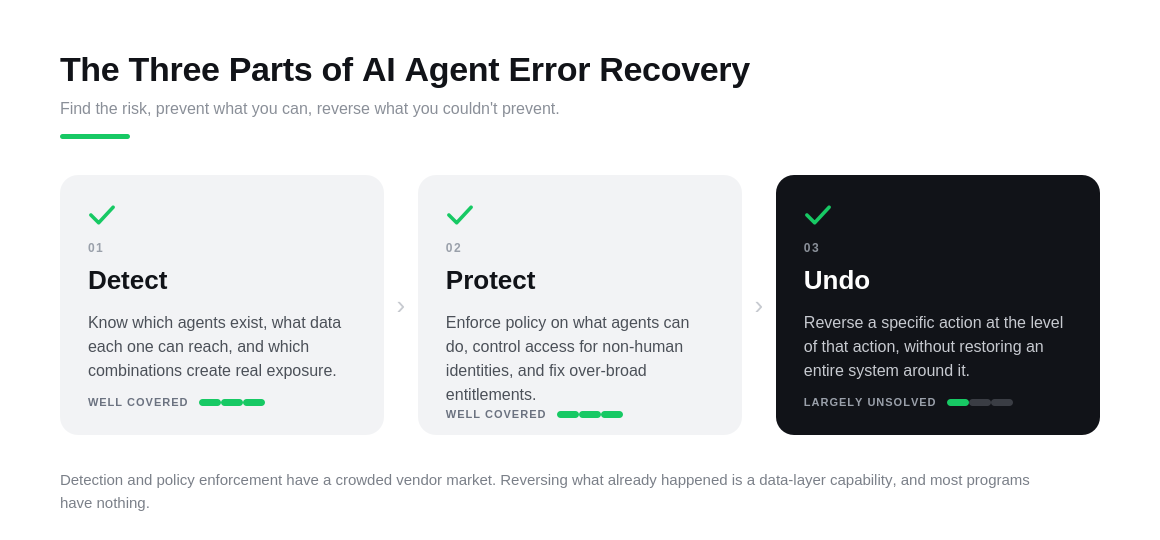
Detect
Know which agents exist, what data each can access, and which combinations of data, identity, and permission add up to real exposure. You can’t govern what you haven’t found.
Protect
Enforce policy on what agents can do and control access for non-human identities the same way you would for people. And fix overly broad entitlements before an agent inherits access it should never have had.
Undo
Reverse a specific action at the level of that action, without restoring an entire system around it. This is the capability most teams have the least of, and the one this article focuses on most.
Not Every AI Agent Action Can Be Undone
Before investing in recovery mechanics, sort your agents’ possible actions into two piles. One you can put back. The other you can only respond to.
The reversible pile is larger than most people expect, and your existing data protection practice already covers it. When an agent edits a file, writes to a database, or changes a configuration, it alters state you are likely already backing up, snapshotting, or versioning.
The irreversible pile is different. Once an agent sends an email to a customer, places an order with a supplier, or pushes a notification to thousands of users, no backup helps. The action left your environment and landed in someone else’s.
|
Action Type |
Reversible? |
Recovery Approach |
|
File edit or deletion |
Yes |
Restore from backup or snapshot |
|
Database write or deletion |
Yes |
Point-in-time rollback |
|
Configuration change |
Yes |
Revert to last known good state |
|
Email sent to a customer |
No |
Compensating action, human follow-up |
|
Order placed with a supplier |
No |
Compensating action, cancel or return process |
|
Notification pushed to users |
No |
Correction notice, escalation path |
For anything in the lower half of the table above, the answer isn’t recovery, it’s a compensating action: A defined step that offsets the original rather than erasing it. A correction email. A cancellation request. Decide these in advance, with a clear escalation path, because inventing one mid-incident is how a small agent error becomes a large, customer-facing one.
You can’t build a recovery plan for actions you haven’t classified.
Detecting AI Risk Across Your Environment
Detection sounds like monitoring, but it starts with inventory. Most organizations can’t list the AI agents and models running in their environment. Some were deployed by IT, others arrived inside SaaS platforms nobody evaluated as AI purchases, and a few were built by a team that wanted to move fast. Shadow AI is the first detection problem, because you can’t watch what you don’t know exists.
The next question is reach. Risk is a function of what an agent can touch, not only what it does today. An agent with read access to a customer database carries a different risk profile than one confined to a scratch directory. That means classifying the sensitive data each agent can access and keeping that map current as permissions change.
The harder problem is correlation. On their own, an unusual data access, a permission change on a service account, and an agent querying a system it rarely touches all look like nothing. Together they are a toxic combination of risk: A pattern that only means something when you can see data, identity, and agent activity in one place.
All of this depends on knowing what normal looks like for a non-human actor, which is why detection and non-human identity security are the same conversation.
This Detection Pattern Already Exists in Data Protection
Your data protection platform has been doing a version of this for years. Anomaly detection on write patterns, behavioral baselines, and blast radius modeling are standard features in platforms built to catch ransomware, and the mechanics of AI and ML enhanced backup and recovery translate directly.
Pointing that capability at agent activity is a smaller lift than building agent monitoring from nothing, and the same discipline that underpins AI data protection and resilience applies here.
Protecting AI Systems with Policy and Access Controls
Detection tells you where the risk is. Protection is what you do before an agent acts.
Start with policy enforcement that runs at the speed agents operate. If no agent may touch regulated customer records without an approval step, that rule must trigger the moment it is breached, not surface in a governance review three weeks later. A weekly report is a record of what has already gone wrong.
The second control is access. Agents routinely inherit permissions from the service accounts they were built on, so an agent scoped to summarize support tickets can end up holding write access to the systems behind them. Fixing excessive entitlements before an agent uses them removes entire categories of incidents.
Then there’s the record. Every agent action should be logged at the action level and written somewhere it can’t be altered. An editable log is worthless twice over: You can’t trust it for debugging, and neither can an auditor. This is what immutable backup practices already deliver for data, applied to the activity record.
Compliance mapping belongs here, not in a separate workstream. The NIST AI Risk Management Framework, the OWASP Top 10 for large language model applications, and the EU AI Act are already in play, and building AI security controls that map to them is cheaper than retrofitting evidence later.
Give Agents an Isolated Place to Work
The strongest protection is keeping agents away from production. Letting them operate against isolated, instantly recoverable copies shrinks the blast radius before anything needs undoing, and the clean room data recovery pattern already gives you the environment.
That environment is also where you rehearse. Run a rollback drill there, against something like multi-agent AI against SQL databases, before an incident forces you to try it live.
How to Undo an AI Agent Action
Undoing an AI action means reversing the specific change an agent made, at the level of that change, while leaving unrelated work in place.
That last clause is the whole game. Reversal is easy if you’re willing to throw away everything that happened alongside the mistake. Precision is the hard part.
You Can’t Undo What You Can’t See
Every undo depends on a prerequisite most environments don’t have: A complete, ordered history of what the agent did. Not a session summary or a conversation transcript, but a sequential record of each action taken, against which object, at what time, with what result.
Without that history, you’re guessing at scope. You know something broke and roughly when, so you reach for the biggest available lever and restore everything from before the window. With it, you can identify the four writes that need reversing and leave the other 900 alone.
Snapshot-Based Rollback for Infrastructure Changes
For anything at the infrastructure layer, snapshot-based rollback is the most mature recovery pattern available today. It’s also the least novel, which is why it works. Point-in-time copies, granular restore, and object-level recovery have two decades of engineering behind them. And instant recovery makes the restore fast enough to use during an incident rather than after one.
The agent context changes the target, not the technique. You’re restoring a specific table, directory, or config object rather than a whole server, because an agent made the change rather than a person or a ransomware payload.
Workflow-Level Compensation for Application Actions
Some agent actions don’t live in your storage layer at all. When an agent approves an expense, updates a CRM record, or triggers a downstream process, the change sits inside an application’s business logic, and restoring a database underneath it can leave that application in a state it doesn’t recognize.
Those actions need a defined reverse step: A compensating transaction that undoes the business action on the application’s own terms. Reverse the approval, restore the previous field values, and cancel the triggered job. This takes design work upfront, per action type, which is why it’s usually the gap in an otherwise solid recovery plan.
Precision Rollback Versus a Full System Restore
The instinct during an agent incident is to roll the whole environment back to a known good point. It’s fast to decide and it works. It’s also a blunt instrument that costs more than the original error.
Restoring an entire system to undo a single agent write means downtime for every user, reversal of legitimate work from the same window, and a recovery time measured against the size of the environment instead of the size of the mistake. Where multiple agents and people work at once, that collateral is not theoretical. Granular, action-level reversal limits how much unrelated work gets caught in the undo.
Why Undo Is the Gap
Undo is the least-covered part of the AI governance stack. The market is full of tools that detect, score, alert, and report. Very few reverse anything, because reversal isn’t a monitoring capability. It’s a data-layer capability, dependent on backups, snapshots, immutability, and granular restore. That’s why agentic AI data protection tends to land with the team that already owns backup and recovery.
Agent Oversight Spans Governance and Infrastructure
Agent actions touch regulated data, so oversight can’t sit with one team. Infrastructure owns the recovery mechanics. Security owns access and policy. Privacy and compliance own what happens when an agent reaches personal data it shouldn’t have. Each team sees a slice of the same problem.
The industry term for the umbrella is AI Trust, Risk, and Security Management, or AI TRiSM, which covers the governance side of what this article has treated as an infrastructure question. Both framings are correct. An agent that deletes the wrong records is a recovery incident and a compliance event at the same time, and organizations running privacy operations agents at scale tend to discover that overlap early.
A Starting Checklist for AI Agent Error Recovery
You don’t need a mature program to start. You need to know what you’re running and what you’d do if it went wrong.
- Inventory every AI agent and model in your environment, including agents embedded in SaaS platforms you didn’t deploy.
- Map which sensitive data each agent can reach and confirm each agent’s permissions match what it really needs.
- Log agent activity at the action level, not just the summary level, and keep those records immutable.
- Classify each agent’s possible actions as reversible or irreversible.
- Define a compensating step or a human escalation path for every irreversible action.
- Run a rollback drill in a non-production environment before an incident forces you to do it live.
Read The Data & AI Trust Gap to see where AI ambition and AI results are coming apart, and what closes the distance.
Frequently Asked Questions
Reversing the specific change an agent made, at the level of that change, while leaving unrelated work in place. In practice, that’s a snapshot rollback for an infrastructure change, or a compensating step for an action inside an application’s business logic.
Disaster recovery restores an entire system after a major event. Agent error recovery targets a single action and leaves everything else untouched. You want both. Reaching for the DR plan to undo one agent write is expensive and reverses legitimate work along with the error.
Anything that leaves your environment. A sent email, a placed order, or a pushed notification has already reached someone else, and no backup retrieves it. File edits, database writes, and configuration changes are reversible.
Partly. Detection is harder when an agent runs inside a vendor environment, because you depend on their logging. But undo works at the data layer, and that layer is yours. If a third-party agent changes data you back up, your snapshots and restores apply regardless.
It spans three groups: The team that owns backup and recovery, the security team that owns access and policy, and whoever deployed the agent. Undo tends to sit with backup and recovery, since that’s where the mechanics live. Unclear ownership is itself a risk worth resolving early.
Yes, especially where several agents and people work at once. Reversing a change can conflict with legitimate work done on top of it afterward. That’s the argument for action-level rollback over broad system restores: The narrower the reversal, the less unrelated work gets caught in it.
The post AI Agent Error Recovery: How to Detect, Protect, and Undo AI Agent Actions appeared first on Veeam Software Official Blog.
from Veeam Software Official Blog https://ift.tt/JxSaCRi
Share this content: