
Key Takeaways:
- Veeam Data Cloud Vault is immutable and logically air-gapped from production by default, so AWS backups land protected with no locking step to configure.
- It connects through Veeam Backup & Replication, where you add it as an Amazon S3 object storage repository, so confirm Backup & Replication is your deployment before planning a move.
- Veeam Vault is built on Amazon S3 Infrequent Access (S3 IA) and billed at one flat per-TB rate, with requests, retrievals, and egress included, so there are no S3 requests, retrievals, or minimum-storage-duration fees to forecast.
- Choosing Foundation or Advanced comes down to your read/restore needs and data residency, not durability, since the AWS edition provides up to 11 nines either way.
For most AWS architects, going offsite with backups isn’t the question. The real decision is where those backups land, and how much ongoing work it takes to keep that landing zone secure, immutable, and isolated from production.
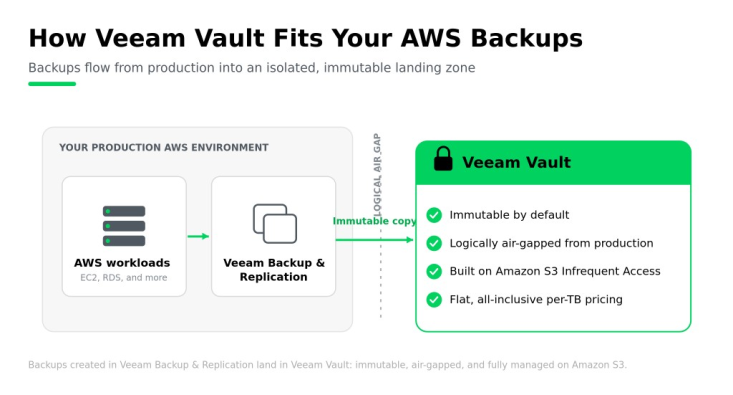
Veeam Data Cloud Vault for AWS is a fully managed, immutable cloud storage target for backups created with Veeam Backup & Replication, logically air-gapped from production by default and billed at one flat per-TB rate. Built on Amazon S3 IA, it gives AWS-protected data a resilient place to land without the setup, tuning, and lifecycle management of a storage layer you assemble yourself.
That landing zone matters more than ever. Veeam’s research puts the stakes plainly: 89% of ransomware attacks now target backups directly, so a recovery copy is only useful if attackers can’t reach or alter it.
This piece is written for architects who already know Veeam Vault and are deciding how it fits. We’ll cover what self-managing AWS backup storage really takes, what Veeam Vault adds for AWS backup data, the requirements to connect it, how to choose between Foundation and Advanced, and how to get started in minutes.
The Real Work of Self-Managed AWS Backup Storage
You can build backup storage on AWS, and plenty of teams do. It works. But standing up storage that’s durable, immutable, and truly isolated is an ongoing engineering effort, not a one-time setup. You’re configuring buckets, setting lifecycle and retention policies, locking down access, and keeping all of it current as your environment and compliance requirements change. That means specialist time spent maintaining storage instead of focusing on recovery and outcomes.
Three realities tend to surface once a do-it-yourself approach is in production:
- Configuration is manual and continuous. Immutability on S3 IA depends on Object Lock, which has to be enabled when the bucket is created and set deliberately to governance or compliance mode to actually hold. It isn’t enabled by default, and a missed setting is a gap you might not notice until you need the backup.
- Isolation takes deliberate design. Backups kept in the same AWS account as production are only as isolated as your IAM boundaries. A single compromised role or credential can reach both your data and its backup, so true separation means extra architecture and governance you own.
- Costs arrive as separate line items. Native S3 IA bills can make costs harder to predict. Storage class pricing, PUT, GET, and LIST request fees, data retrieval fees, and minimum storage duration charges can all add up, especially when data is deleted early. That complexity makes it easy to under-forecast spend and harder to avoid surprise bills.
There’s also a quieter cost: Seams. When your backup software and storage come from different vendors, every integration point is one more thing to manage, monitor, and troubleshoot. Consolidating with a single trusted vendor removes those seams, and if you’re already a Veeam customer, it’s one less thing to stitch together. These are the same challenges of cloud storage for backups teams run into whenever they weigh building their own target against a managed one, and it’s worth comparing a managed vault against S3-compatible storage before committing.
Veeam Vault flips that model. Instead of designing and maintaining the storage layer, you get a target that’s preconfigured for resilience from day one, which is where the next section picks up.
What Veeam Vault Adds for AWS Backup Data
Veeam Vault is a purpose-built, fully managed storage target designed to receive your Veeam backups and keep them resilient, with no infrastructure for you to run. On AWS, it connects through Veeam Backup & Replication, where you add it as an Amazon S3 IA object storage repository and point your backups at it. There’s no separate storage stack to build and no integration to maintain.
Under the hood, Veeam Vault’s AWS edition is built on Amazon S3 IA, specifically the Infrequent Access storage class, so you get durable, familiar object storage delivered as a managed service rather than a set of components you assemble and tune. What sets it apart is that resilience is the default, not a configuration project:
- Always immutable. Every backup lands in a write-once, read-many (WORM) state by default. There’s no Object Lock mode to select and no bucket setting to get right, so a recovery copy is protected the moment it’s written.
- Logically air-gapped. Veeam Vault is logically air-gapped from your production environment, keeping a recovery copy isolated from a compromised AWS account, role, or credential.
- Encrypted end to end. Backup data is protected with AES 256-bit encryption in flight and at rest, and you alone hold the keys.
- One vendor, one bill. Storage, requests, retrievals, and egress are included in a single flat per-TB rate, with single-vendor support for both the software and the cloud storage behind it.
For a fuller product overview, see Veeam Data Cloud Vault. You can also watch it in action in this AWS and Veeam Vault product demo, or see the wider hybrid-cloud picture in the Veeam and AWS hybrid resilience webinar.
Here’s how a self-managed Amazon S3 approach compares with Veeam Vault, feature by feature:
| Capability | Self-managed Amazon S3 (Standard-IA) | Veeam Vault |
| Immutability | S3 Object Lock, enabled at bucket creation and configured per mode | Immutable by default (WORM), no setup |
| Isolation from production | Bounded by your IAM design within the account | Logically air-gapped from production |
| Setup and maintenance | Manual bucket, lifecycle, and policy configuration | Preconfigured and fully managed |
| Cost structure | Storage, PUT/GET/LIST requests, retrieval, and minimum-storage-duration fees | All included in one flat per-TB rate |
| Support | Separate vendors for backup and storage | Single-vendor support |
| Encryption | You configure and manage | AES 256-bit in flight and at rest, keys held by you |
Requirements for Veeam Vault for AWS
Getting Veeam Vault ready for AWS comes down to having the right Veeam product in place and an AWS account to subscribe through. Because Veeam Vault is a storage target rather than a separate backup tool, it plugs into the backup workflow you already run in Veeam Backup & Replication.
Here’s what you need on each side:
- Veeam Backup & Replication. The AWS edition connects through Veeam Backup & Replication, where you add Veeam Vault as an Amazon S3 object storage repository. Confirm this is your deployment before planning a move, since it’s the supported integration path for this edition.
- You’ll need your own AWS account to connect Veeam Vault and to generate the access keys that Veeam Backup & Replication uses. If you buy through the AWS Marketplace, you’ll also subscribe from within that account. However, if you purchase through the Veeam Online Store, a reseller, or a service provider, you can connect Veeam Vault without the AWS Marketplace subscription step.
- A Veeam Data Cloud login. You’ll complete Veeam Vault tenant setup at cloud.veeam.com, which is where you generate the access key and secret key pair for the connection.
There’s one setup detail worth calling out, because it differs from the Azure edition’s account-based, credential-free connection. On AWS, you copy an access key and secret key into Veeam Backup & Replication yourself, and the secret key can’t be viewed again once the setup wizard closes. So make sure to capture it securely during setup, so you don’t have to regenerate credentials later.
On workloads, Veeam Vault stores whatever your Veeam Backup & Replication deployment protects.
One exclusion to flag up front: Veeam Vault isn’t currently available in AWS GovCloud regions. If you operate in a GovCloud or otherwise regulated environment, confirm regional availability before planning a deployment. For authoritative, always-current setup details, the Veeam Help Center is the source of record.
Which Is Right for You: Foundation or Advanced
Veeam Vault comes in two editions, Foundation and Advanced, and the right one depends on how you’ll use it, not on the size of your company. Plenty of large enterprises run Foundation because they don’t restore often, while some smaller teams choose Advanced for the headroom. Both editions share the essentials: Backups are immutable by default, encrypted with AES 256-bit, and protected on Amazon S3 IA with up to 11 nines of durability. The differences come down to how much you read and restore, and how precisely you control where data lives.
| Foundation | Advanced | |
| Durability | Up to 11 nines | Up to 11 nines |
| Read and restore | Fair use | Unlimited |
| Data locality | You specify the country | You specify the region |
| Regional availability | Core regions | Core and non-core regions per AWS’s region list |
| Shared by both | Immutable by default, AES 256-bit encryption, built on Amazon S3 IA | |
Foundation is right for you if:
- Cost predictability matters more than frequent restores.
- Recovery testing happens occasionally rather than continuously.
- A single-country data residency requirement is enough.
- Veeam Vault is a secondary or tertiary copy, not your primary recovery source.
Advanced is right for you if:
- You run frequent recovery tests or DR drills and want read and restore costs off the table.
- You have a region-level, not just country-level, data residency requirement.
- You need Veeam Vault available in a specific AWS region beyond the core list.
- Veeam Vault is a primary recovery source where unlimited restore access matters.
Getting Started with Veeam Vault
The whole point of a managed target is speed, and Veeam Vault is built to be usable in minutes rather than days. There’s no infrastructure to stand up, no capacity to plan, and no separate request or egress billing to configure. You subscribe, connect it to Veeam Backup & Replication, and point your backups at it.
You can buy Veeam Vault three ways: Through the AWS Marketplace for self-service, through a preferred reseller, or via a service provider. Veeam Vault is billed on a flat per-TB basis, so your storage spend is set and predictable from the start.
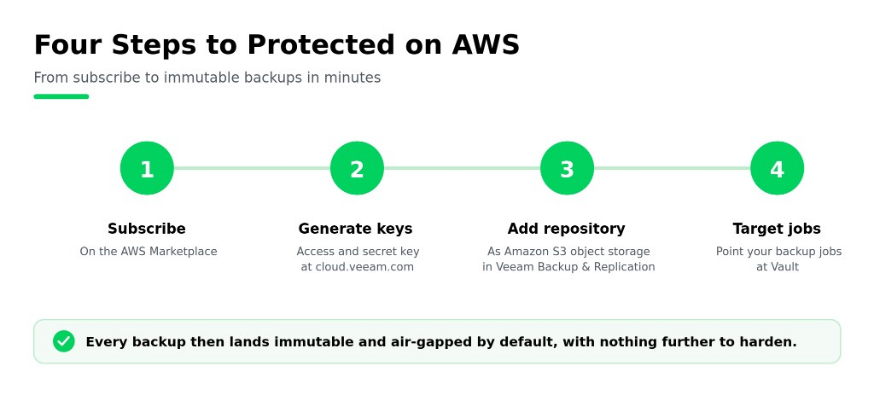
For a self-service setup through the Marketplace, the flow is short:
- Subscribe to Veeam Vault through the AWS Marketplace listing for your region.
- Complete tenant setup at cloud.veeam.com, then generate your access key and secret key (capture the secret key before the wizard closes).
- In Veeam Backup & Replication, add Veeam Vault as an Amazon S3 IA object storage repository using those keys.
- Target your backup jobs at the new repository.
That’s it. From there, every backup that lands in Veeam Vault is immutable and air-gapped by default, with nothing further to harden. To compare editions and purchase paths in one place, see Veeam Vault purchasing options.
Want to see it first? Watch the AWS and Veeam Vault product demo to see the setup and a recovery end to end in under 30 minutes.
Ready to get started? Get Veeam Vault on the AWS Marketplace in minutes, or learn more about Veeam Vault.
FAQs
Yes. Every backup written to Veeam Vault is immutable by default, placed in a write-once, read-many (WORM) state, with no Object Lock mode to select or bucket setting to configure. Veeam Vault is also logically air-gapped from production, so a recovery copy stays isolated from a compromised AWS account, role, or credential.
The AWS edition connects through Veeam Backup & Replication, where you add Veeam Vault as an Amazon S3 object storage repository. Support for Veeam Kasten and Veeam’s Azure-focused products applies to the Azure edition, not the AWS edition.
Foundation and Advanced share immutability, AES 256-bit encryption, and up to 11 nines of durability on Amazon S3. Advanced adds unlimited reads and restores rather than fair use, and region-level data locality rather than country-level. Choose based on how often you restore and how tightly you need to control residency.
Not currently. Veeam Vault is not available in AWS GovCloud regions today. If you operate in a GovCloud or otherwise regulated environment, confirm regional availability with Veeam before planning a deployment.
Yes. Veeam Vault is a fully managed storage service. Veeam handles the underlying storage, immutability, and durability, so there’s no infrastructure for you to provision, configure, or maintain. You subscribe, connect it to Veeam Backup & Replication, and target your backups.
For a full list of AWS regions available, please see our edition comparison (link to edition comparison).
The post Veeam Data Cloud Vault for AWS Backup: Immutable Storage Outside Your AWS Account appeared first on Veeam Software Official Blog.
from Veeam Software Official Blog https://ift.tt/wCLz0ME
Share this content: